Quicksilver Tip: Get IP
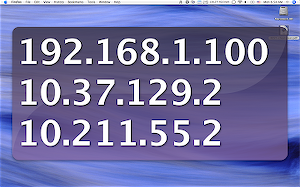
I just came across nifty feature in Quicksilver. For those of you not familiar with Quicksilver, it’s a little tool for Mac OSX that does everything from launches applications to scales images with a few, quick keystrokes—and, as I just figured out, reveals your ip. I normally get this by doing an ifconfig in a terminal, or pulling up System Preferences. No longer. Now, when I need to see my IP, when browsing my mac from my Parallels installation, I summon Quicksilver with ⌃ Space, type ‘IP’, and hit ‘Enter’. Bam, all of the ip addresses of my various network interfaces are shown. Yet another nifty timesaver from Quicksilver.
If you haven’t tried Quicksilver, save yourself some life and download it now. I’m sure it does something you’ll find invaluable.
Update: Tieg mentioned that he was having trouble with this tip. It turns out that you have to have the “extra scripts” plugin enabled. If you still don’t see it, you might have to scroll through the various actions that come up for ‘IP’. I hope that helps.